
How to upgrade your plan
Goal
Move off the free plan so you get unlimited access to premium AI models.
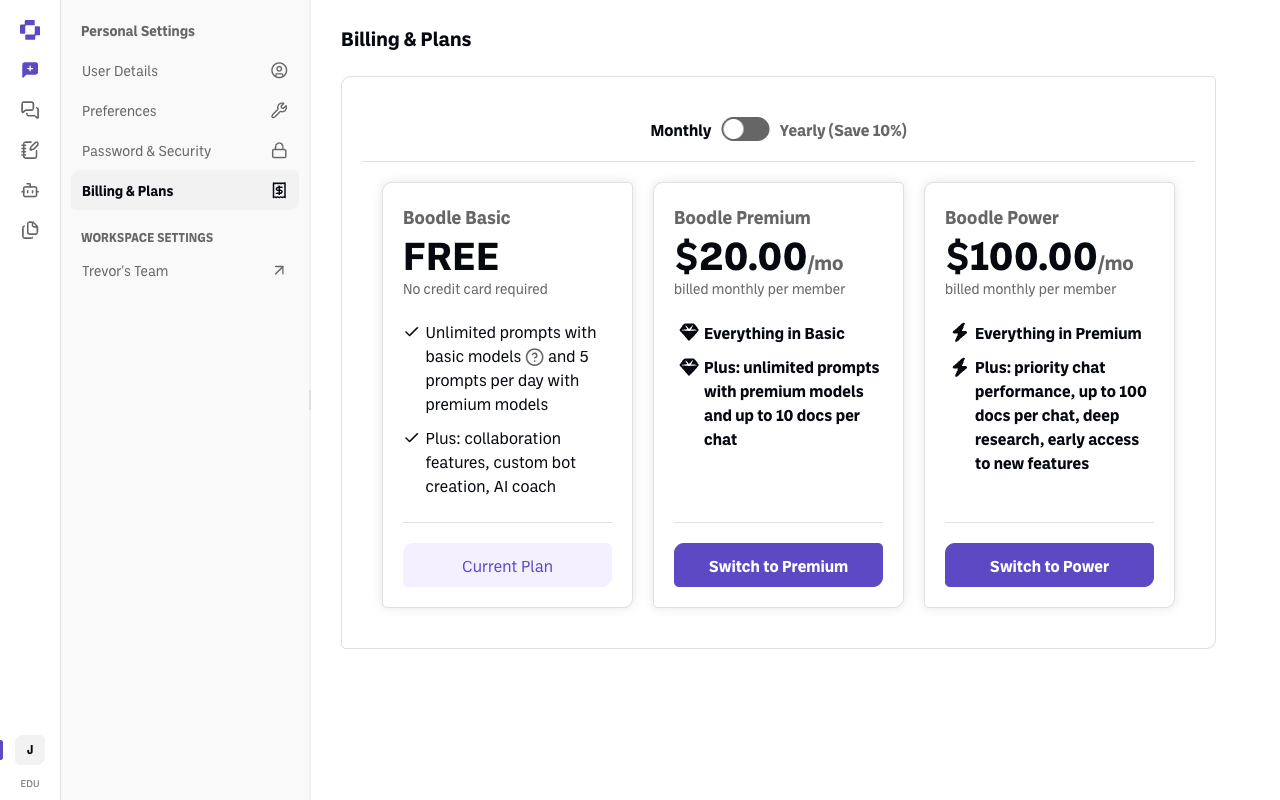
The plans
| Plan | Price | What you get |
|---|---|---|
| Boodle Basic | Free, no credit card required | Unlimited prompts with basic models, 5 prompts per day with premium models, up to 10 docs per chat and 30 Knowledge files per bot, plus collaboration features, custom bot creation, and AI coach |
| Boodle Premium | $20.00/mo per member — $16.00 for education | Everything in Basic, plus unlimited premium-model prompts |
| Boodle Power | $100.00/mo per member | Everything in Premium, plus priority chat performance, up to 100 docs per chat and 100 Knowledge files per bot, deep research, and early access to new features |
Yearly billing saves 10%. Most people upgrading from free want Boodle Premium.
If you're at a school, you get the education rate automatically
Premium is $16/user/month instead of $20 when your account's email ends in .edu. The discount is applied when you upgrade — there's no code to enter and nothing to ask for. If you're using a .edu address, just upgrade normally and you'll be charged the education rate. .edu accounts also get a Semester billing cycle — see Semester pricing for Boodle Premium.
If you're at an institution but your account uses a non-.edu address, the discount won't apply on its own — reach out through our contact form before you upgrade.
"Boodle Unlimited" was renamed to Boodle Premium. Same plan, new name, so an older article or invoice mentioning Unlimited is referring to Premium.
First: decide which one you're upgrading
This is the step people most often get wrong. You have a personal account and possibly a team workspace, and each has its own separate subscription:
| Upgrade this | Where | When you want it |
|---|---|---|
| Your personal account | Personal Settings → Billing & Plans | Just you. You can't add anyone else to a personal account |
| Your team workspace | Workspace Settings → Billing | You're covering other people too |
⚠️ A team workspace already includes a seat for you. So if your personal account is also on a paid plan, you no longer need it — cancel that subscription once your team workspace is set up. See How to cancel your subscription.
Quick path
- Click your initials (bottom-left) and make sure you're in the account or workspace you want to upgrade.
- Open Billing & Plans (personal) or Workspace Settings → Billing (team).
- Choose Monthly or Yearly, then click Switch to Premium.
Step-by-step
Check which account you're in. Click your initials at the bottom-left — the workspace with a check mark next to it is where you are. If that isn't the one you mean to upgrade, click the one you want.
Open the right billing page. For yourself, click Personal Settings → Billing & Plans. For your team, click your workspace name under Workspace Settings, then Billing.
Pick a billing cycle. Use the Annual plan pricing switch to move between Monthly and Yearly (Save 10%).
Click Switch to Premium (or Switch to Power) and confirm.
Verify it's working
- Your chosen plan's card now has a greyed-out Current Plan button instead of Switch to ….
- Premium-model prompts stop hitting the 5-per-day limit.
Still stuck?
Individual subscriptions are billed via Stripe. Institutional pricing for a school, district, or organization — bulk seats, invoicing, purchase orders — is handled by the team, so submit a request through our contact form rather than upgrading seat by seat. (See also How to manage your plan & seats.)